
For tool consolidation
Fewer tools. One connected workspace.
Every extra app is another login, another copy of your customer list and another thing to keep in step.
What it can bring together
An overview of the kinds of tools GrowthBase360 can stand in for, and the ones it deliberately works alongside.
| The job | In GrowthBase360 | What happens to your other tool |
|---|---|---|
| Contacts and deals | Pipelines and Customer 360 | Can be replaced |
| Booking links | Calendar & Booking | Can be replaced; your calendar stays connected |
| Forms and landing pages | Lead Generation | Can be replaced |
| Email campaigns | Email Marketing | Can be replaced for straightforward campaigns |
| Social scheduling | Social Media | Can be replaced |
| Simple workflow automation | Automations | Can be replaced for work inside the platform |
| Quotes and invoices | Accounting | Keep your bookkeeping software; connect Xero or QuickBooks |
| Online store and payments | E-commerce & Payments | Keep them; their information comes in as a read-only copy |
Everything meets at the customer
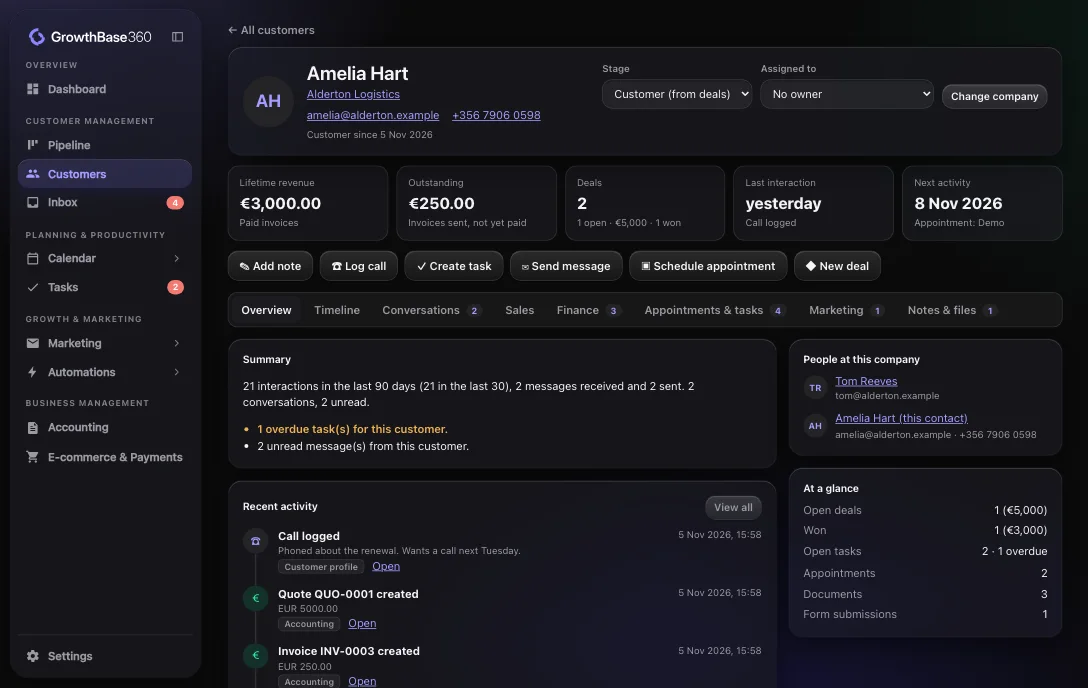
When your tools share one customer record, the work of keeping them in step goes away.
- One customer list, not several copies
- One place to see what happened and what is next
- One set of team members and roles
Example workflow
What used to take three tools
A booking, a CRM update and a reminder, joined up without copying anything across.
Booking, CRM and reminder together
WhenA meeting is booked
ThenCreate a task to prepare
ThenAdd a note to the deal
ThenSend an email to the contact
Getting started
A sensible way to switch
You do not have to move everything at once.
- Start with your pipeline and customers
- Connect your email and calendar
- Replace one tool at a time, when you are ready
Bring your business together.
Discover a smarter way to manage, market and grow your business.